
Plus
US$ 16.95/mo
- 2 vCore CPU
- 4 GB Memory
- NVME 80 GB Disk
- Unlimited Traffic
 Self-hosted PaaS · Rio de Janeiro or São Paulo
Coolify is an open-source platform that deploys applications on your own server, as an alternative to Heroku, Vercel and Netlify. At Mega, the VPS arrives with Coolify and HTTPS already set up, in Rio de Janeiro or São Paulo, Brazil, your choice.
Coolify requires 2 vCPU and at least 2048 MB of free memory, so we recommend starting at Plus. Pro, with 4 GB, is the recommended plan: it leaves memory for the apps you deploy.
Billed monthly in US dollars, with the panel installed. Rio de Janeiro or São Paulo, same price. Need more than the largest plan shown? Upgrade from the client area, without reinstalling.
With Rio de Janeiro selected, your VPS with Coolify runs in Mega's original data center, on our own network with a presence at the Rio internet exchange (IX.br) and redundant transit. It is the lowest latency for users in Rio, Espírito Santo and Minas Gerais, and our support team works in the same city as the server.
With São Paulo selected, your VPS with Coolify runs in our environment next to the busiest internet exchange in Latin America, on our own network with redundant transit. It is the shortest path to users across Brazil and South America and to banks, payment gateways and APIs hosted in São Paulo. Same price as Rio.
Coolify is an open-source dashboard that puts applications online on your own server. It connects to repositories on GitHub, GitLab, Bitbucket or any other Git host, detects the project's language, builds the image and deploys it, and it can repeat the process on every push.
It also supports Docker images, docker-compose files and a catalog of one-click services such as PostgreSQL, MySQL, Redis, WordPress and n8n. Databases can have scheduled backups.
At Mega Dedicados, Coolify is installed on Debian 13 with Docker. The server itself is already registered as a deploy target and the proxy is running. The dashboard interface is available in English only.
Source: Official Coolify documentation
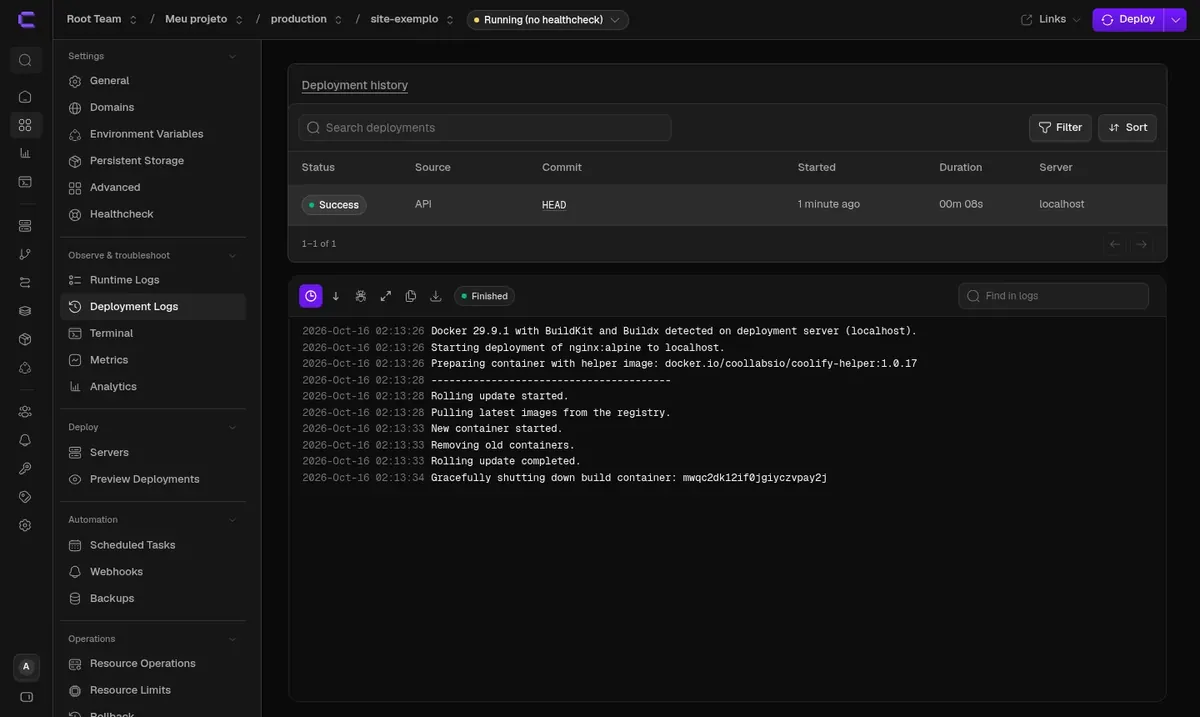
Each push to the branch triggers a new deployment, with history and the option to roll back to the previous version.
Node, Python, PHP, Go, Ruby, Java and static sites, without having to write a Dockerfile.
PostgreSQL, MySQL, MongoDB and Redis created in a few clicks, with scheduled backups.
WordPress, n8n, Uptime Kuma and other ready-to-install tools, available inside the dashboard.
A copy of the app for each pull request, so you can review changes before they go to production.
Organize clients and systems into separate projects and teams on the same server.
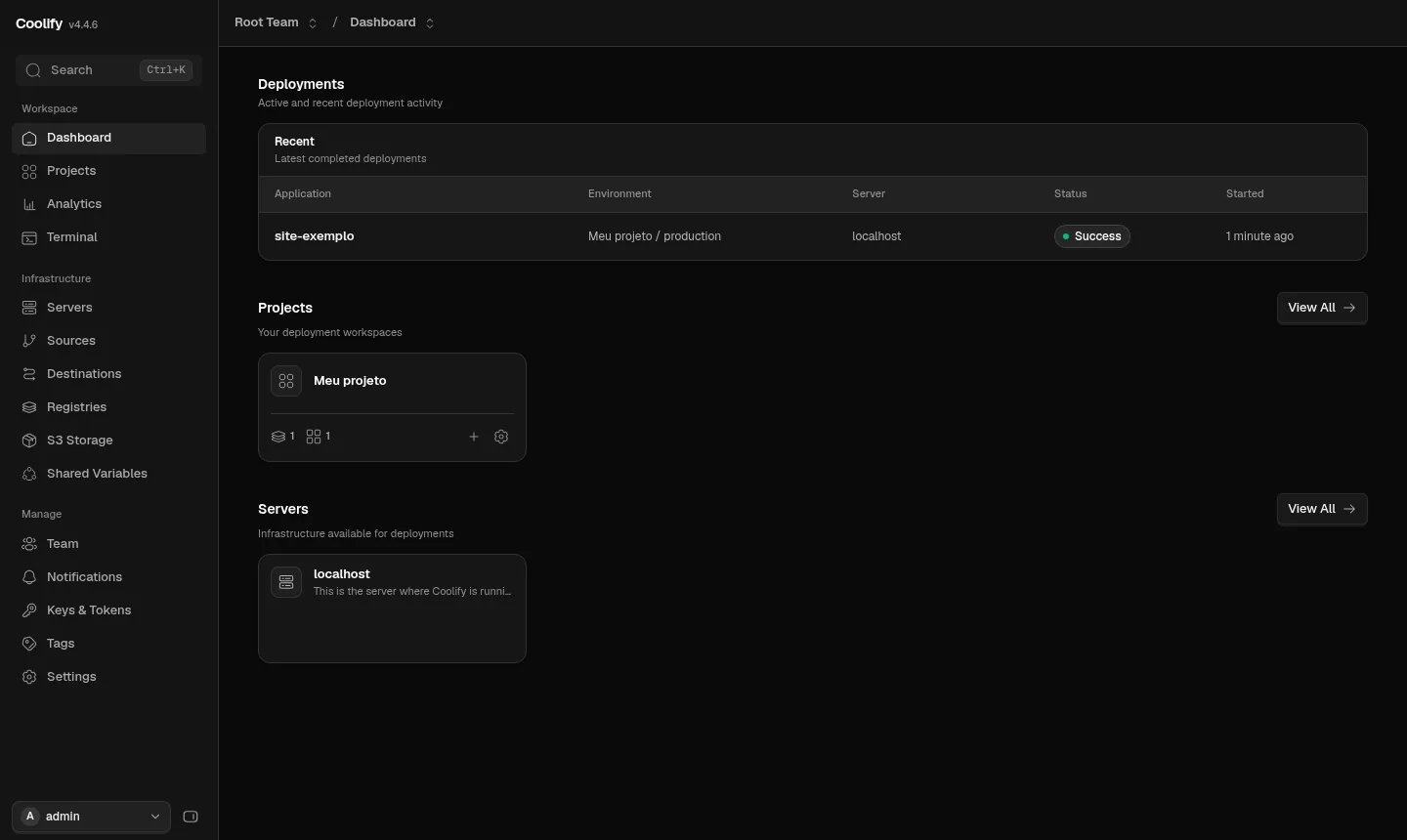
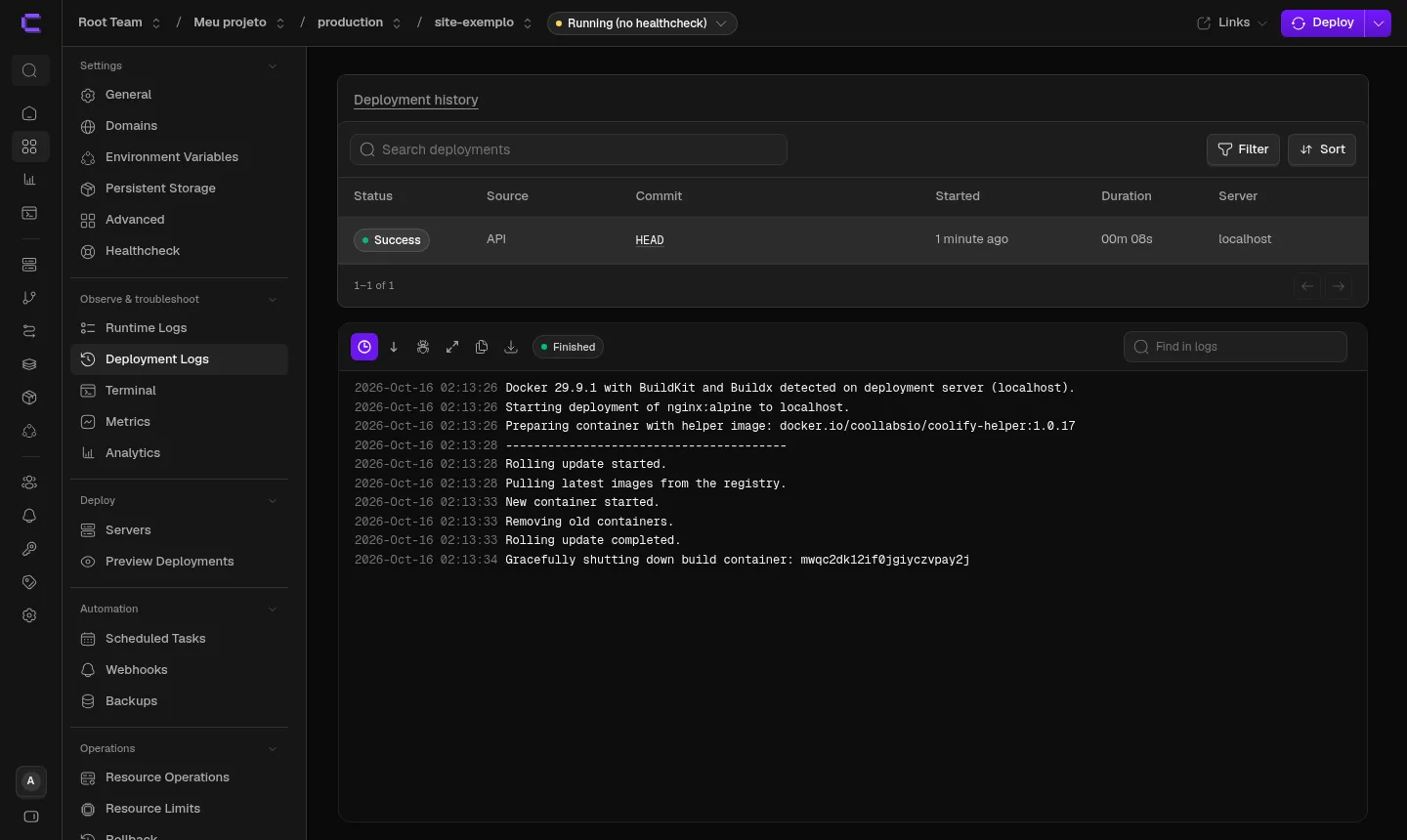
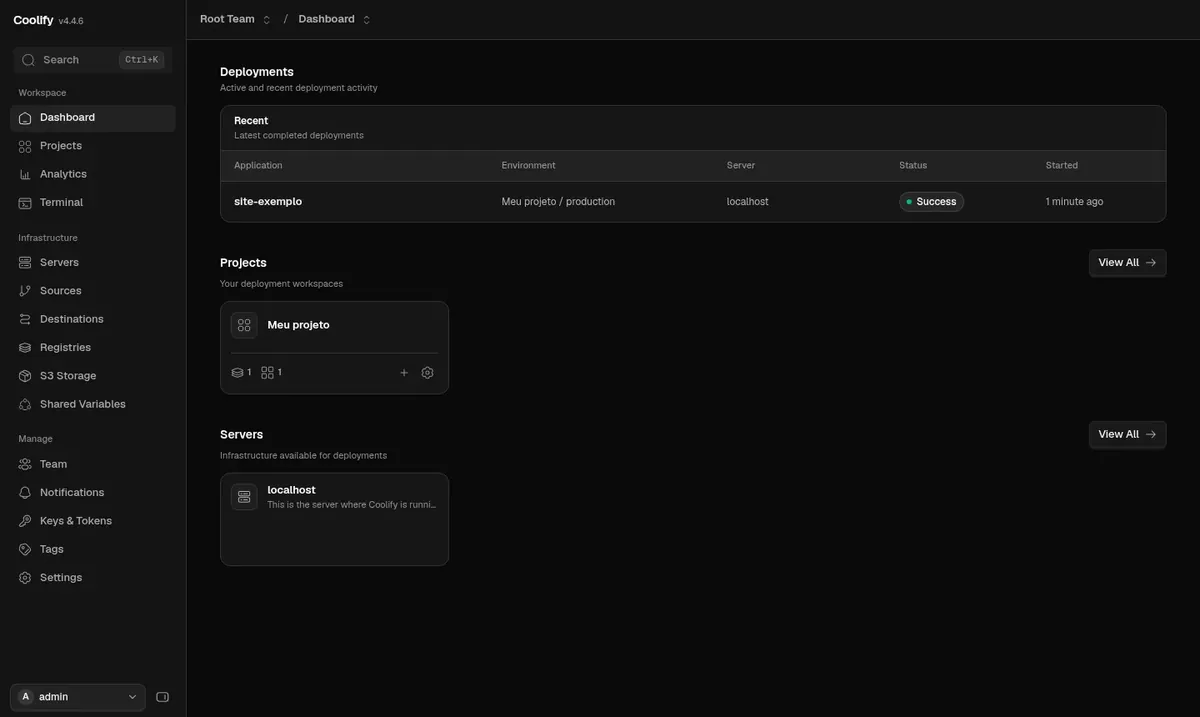
Screenshots taken by the Mega Dedicados team on a test installation, with no customer data.
Installed with the official installer, with automatic updates turned on.
An account with your email and a password generated on the server's first boot. Public registration is closed.
The dashboard answers on its own address with a certificate, so you don't need port 8000.
The VPS itself appears as a deploy target, with the proxy running.
Ports 8000, 6001, 6002 and 8080 are not reachable from the internet.
You go straight to the dashboard and can create your first project right away.
Select Plus, Pro or Turbo and tell us whether the server should be in Rio de Janeiro or São Paulo, Brazil. The price is the same in both.
Pay with Pix, credit card or boleto, on a monthly, semiannual or annual cycle, with no lock-in contract.
Once payment is confirmed, the server is created with Coolify and HTTPS already set up. Passwords and certificates are generated on first boot.
The dashboard address and login details are sent by email and WhatsApp.
Add the memory of the apps you plan to deploy to the roughly 500 MB that Coolify uses, and choose the plan that fits that total. If you build often, prioritize more vCores.
| Plan | Best for |
|---|---|
| Plus 2 vCore · 4 GB | For testing Coolify or deploying one or two light apps, accepting slower builds with only 2 vCores. |
| Pro 4 vCore · 6 GB | The recommended plan: it handles a few small or medium apps, with memory to spare beyond Coolify and reasonable build times. |
| Turbo 4 vCore · 12 GB | For those deploying several apps or databases that need more memory, keeping the same processor as Pro. |
| Max 6 vCore · 18 GB | For larger projects, with many apps running together and frequent builds that take advantage of the 6 vCores. |
Coolify is free and open source, so you only pay for the VPS: Plus is US$ 16.95 and Pro, the recommended plan, is US$ 21.95 per month. There is no charge per app, and the contract has no lock-in.
The dashboard needs at least 2 vCPU and 2048 MB of free memory, and it uses about 500 MB when idle. That is why Plus is the starting point, and Pro, with 4 GB, is the best choice if you will run more than one app.
To get your own address with HTTPS, yes: point the domain (A record) to the VPS IP and enter it in the app inside Coolify. If you only want to test, Coolify generates an automatic address.
We don't recommend it. Coolify takes over the whole server, including ports 80 and 443. Install your apps through Coolify itself, which has a large catalog of ready-made services.
It only answers on the HTTPS address and requires a login, and public registration is closed. Ports 8000, 6001, 6002 and 8080 are not open to the outside, and the VPS has inline DDoS protection.
The Coolify interface is English only, and the dashboard is documented by its developers. Mega Dedicados support runs 24/7 in Portuguese, by WhatsApp, ticket and phone, and covers the server side: hardware, network, system and performance.
Yes. Automatic updates are turned on by default. If you prefer to update manually, you can turn this option off in Settings.
The server is in a data center in Rio de Janeiro or São Paulo, Brazil, and you choose the location when you order, at no price difference. You get root access via SSH, plus the VPS management panel in the client area.
Updated on October 19, 2026
Tell us what you will host and we will suggest the panel and the size. Delivered installed.


