
Plus
US$ 16.95/mo
- 2 vCore CPU
- 4 GB Memory
- NVME 80 GB Disk
- Unlimited Traffic
 Monitoring · Rio de Janeiro or São Paulo
Order a VPS from Mega Dedicados and get Zabbix up and running: server, web interface and PostgreSQL database ready, with an HTTPS address and an administrator account created. You choose Rio de Janeiro or São Paulo, Brazil, and can start adding your devices right away.
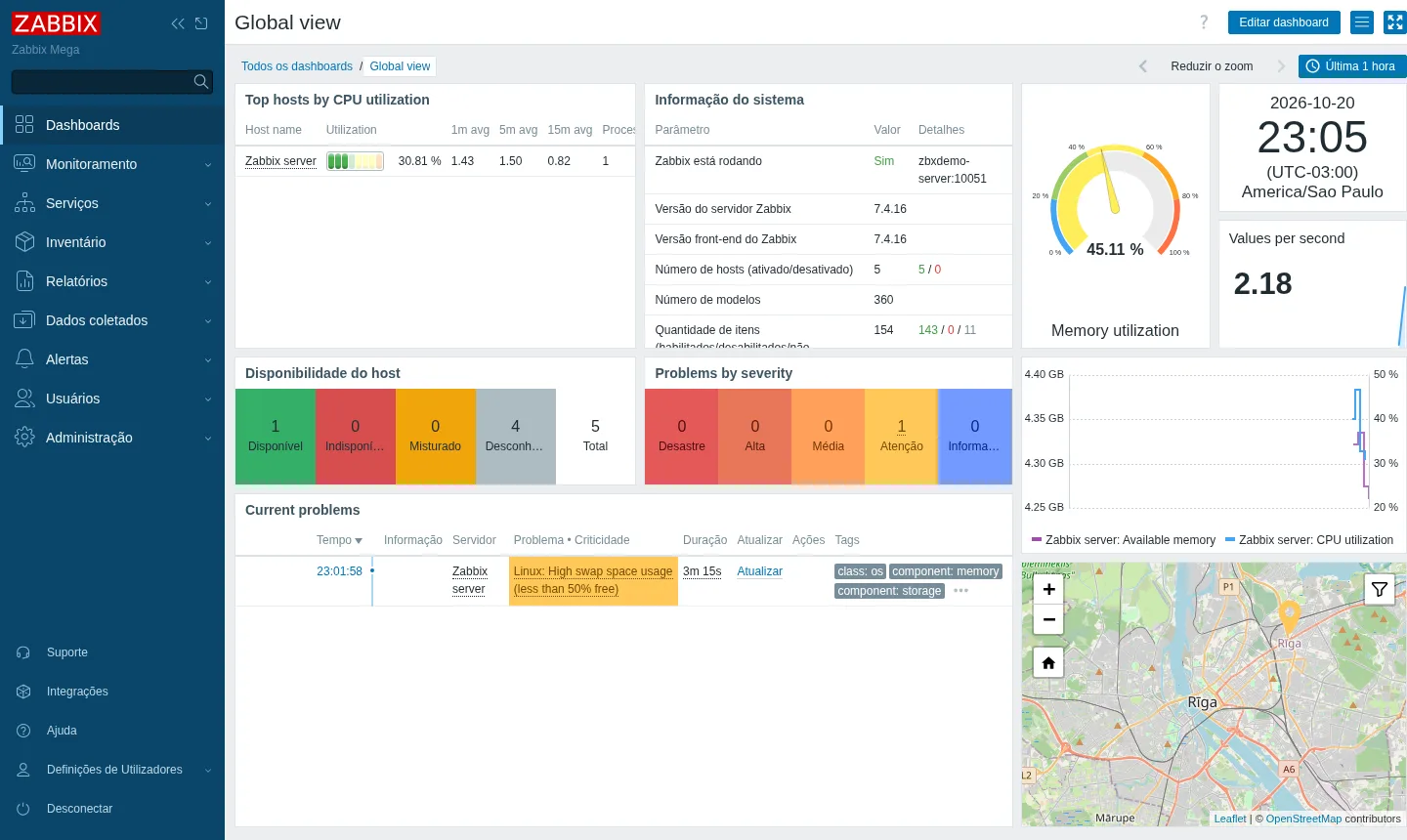
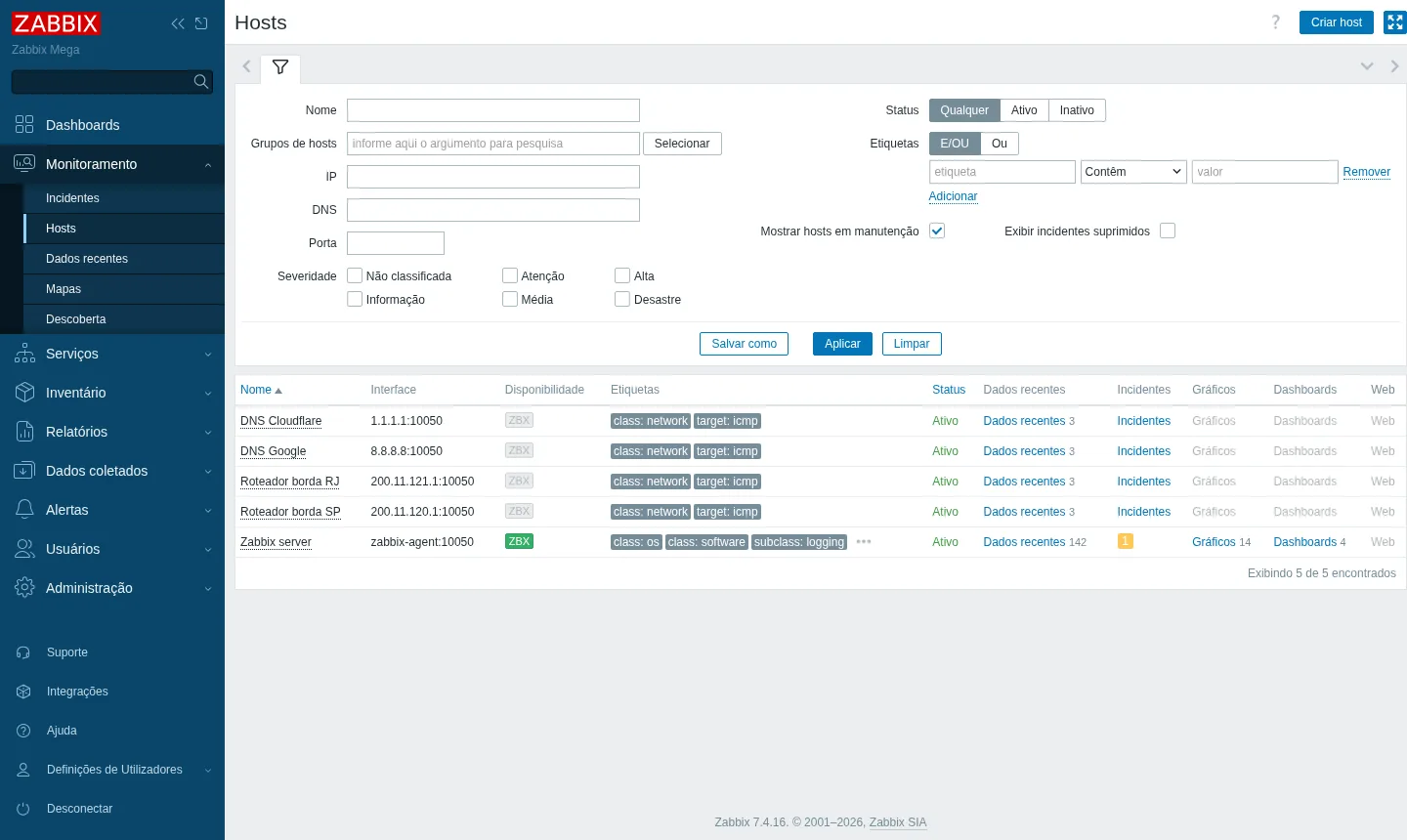
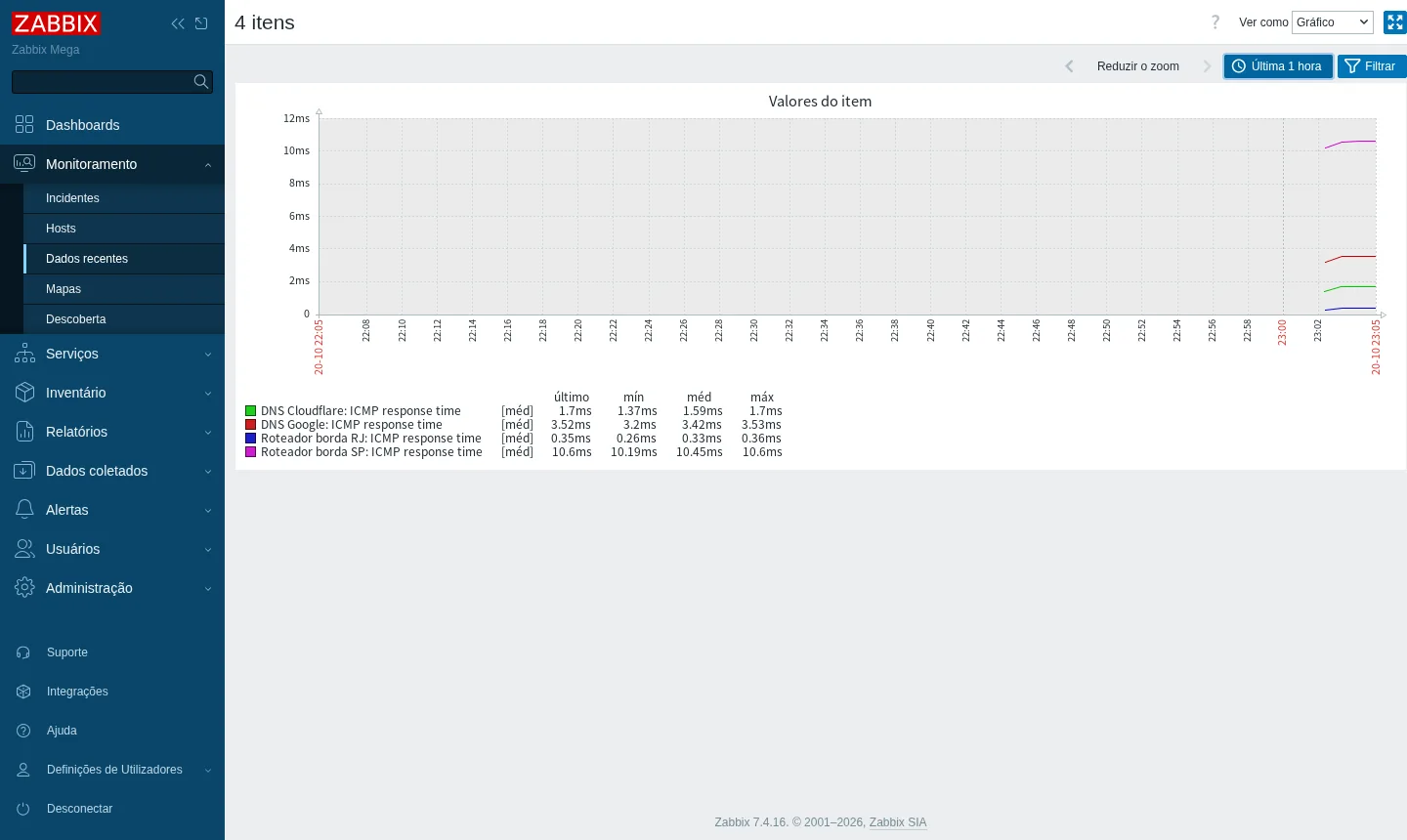
Zabbix needs at least 3072 MB of free memory, so the starting point is Plus (US$ 16.95), with 4 GB. To leave room as your device list grows, we recommend Pro (US$ 21.95).
Billed in US dollars, with the app installed. Rio de Janeiro or São Paulo, same price. Plans start at the smallest size where the app runs well. Need more? Upgrade from the client area, without reinstalling.
With Rio de Janeiro selected, your VPS with Zabbix runs in Mega's original data center, on our own network with a presence at the Rio internet exchange (IX.br) and redundant transit. It offers the lowest latency for users in Rio, Espírito Santo and Minas Gerais, and our support team works in the same city as the server.
With São Paulo selected, your VPS with Zabbix runs in our environment next to the busiest internet exchange in Latin America, on our own network with redundant transit. It is the shortest path to users across Brazil and South America and to banks, payment gateways and APIs hosted in São Paulo. Same price as Rio.
Zabbix is an open-source monitoring platform maintained by Zabbix SIA of Latvia and licensed under AGPLv3 since the 7.0 series. Internet providers, data centers and companies use it to watch servers, switches, routers, OLTs, virtual machines, databases and applications. The current release is 7.4, and 7.0 is the current LTS, with full support until June 2027.
Data can arrive through the agent (agent2), SNMP versions 1, 2c and 3 (with traps), ICMP ping, IPMI, JMX, HTTP/API, SSH or scripts. Auto-discovery finds devices and interfaces, and more than 360 ready-made templates cover MikroTik, Huawei, Cisco, Juniper, Fortinet, Ubiquiti, Linux, Windows and more. Triggers support severity levels, dependencies and maintenance windows.
Alerts go out by email, Telegram, Slack or webhook, which lets you connect Zabbix to a WhatsApp API. It includes dashboards, graphs, network maps, service SLA, reports and a full JSON-RPC API. The web interface is translated into Brazilian Portuguese.
Source: Official Zabbix documentation (accessed October 2026)
Track OLTs, switches and PPPoE concentrators over SNMP, with an alert when a port or device goes down.
Use ping to monitor the availability of links and of the equipment installed at each customer's site.
Install the agent on Linux and Windows machines to see CPU, memory, disk and services in a single dashboard.
Get problem notifications on Telegram or WhatsApp, the latter through a webhook with a messaging API.
Graph the usage of each interface to understand peaks, bottlenecks and network growth.
Measure service availability and issue reports to prove contract compliance.
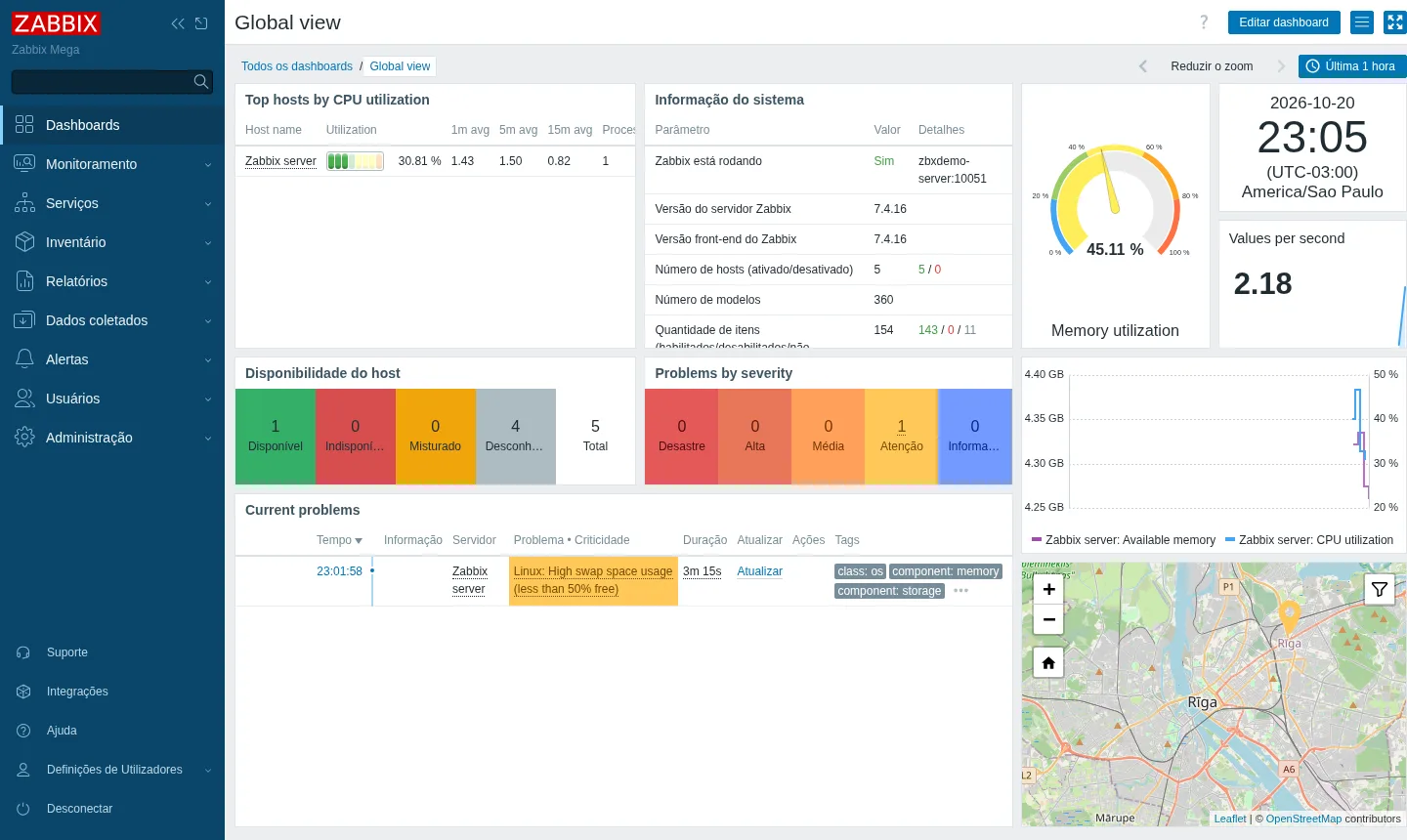
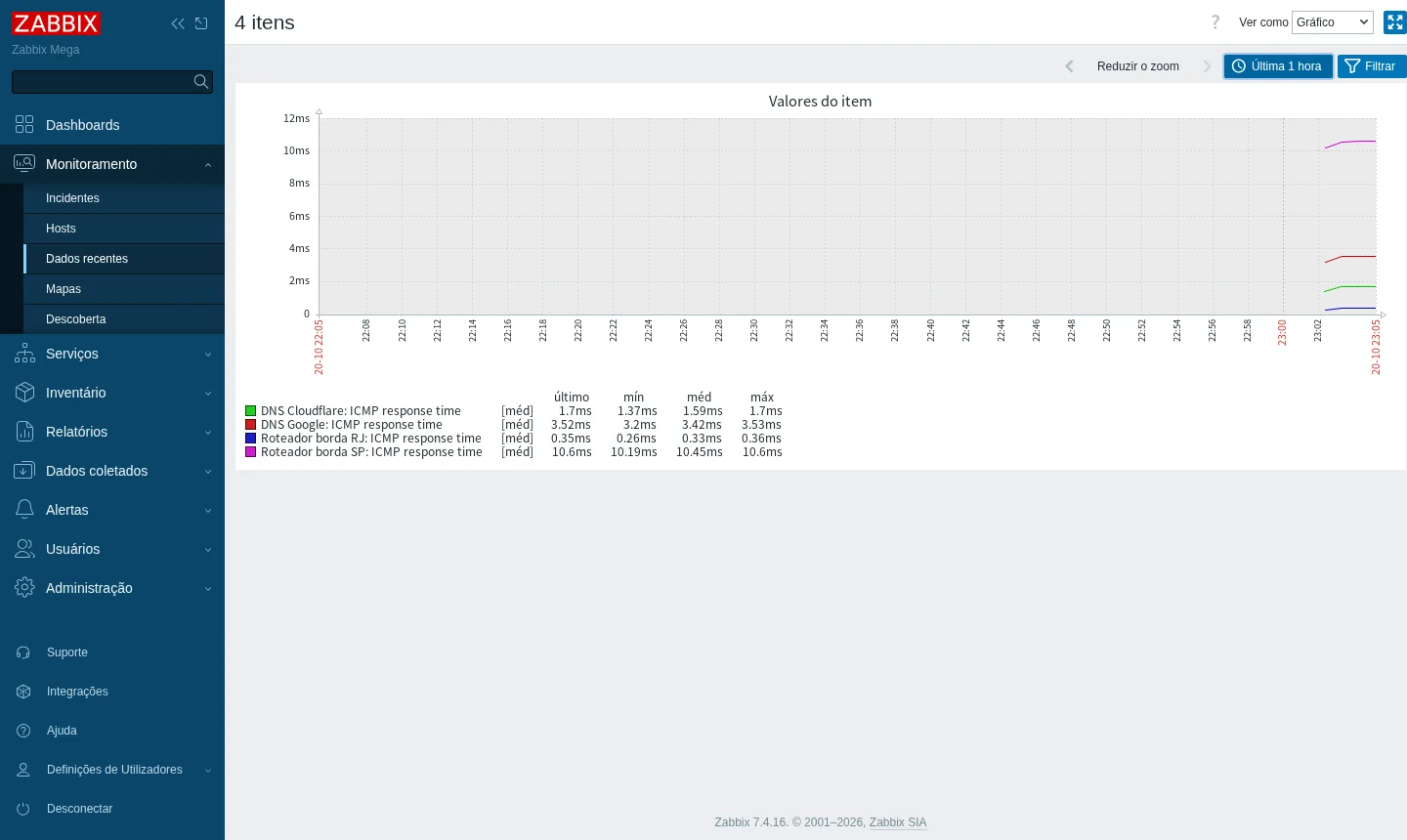
The screenshots come from a Mega test installation, with no customer data.
Debian 13 with Docker, ready for you to manage over SSH with root access.
Zabbix server, nginx web interface and PostgreSQL database, already connected to each other.
The VPS itself is monitored from your first login, through the agent installed on the machine.
A dedicated domain for the dashboard, with a valid Let's Encrypt certificate.
Port 10051 is open so active agents and proxies can send data to the server.
The Admin password is changed at delivery, and the credentials reach you by email and WhatsApp, for you only.
Select Plus or Pro and the server city: Rio de Janeiro or São Paulo, Brazil. In our test, ping to the Mega network edge was 0.3 ms in Rio and 10 ms in São Paulo.
Pix, card or boleto (Brazilian bank slip), on a monthly, semiannual or annual cycle, with no lock-in.
The Zabbix address, the administrator login and the server details arrive by email and WhatsApp.
Log in to the interface, pick a ready-made template for each type of device and let data collection begin.
Zabbix requires at least 3072 MB of free memory, so Pro is the recommended plan, giving room to the database and to new hosts. Turbo and Max suit larger environments.
| Plan | Best for |
|---|---|
| Plus 2 vCore · 4 GB | Meets the Zabbix minimum for a lab, testing or a few devices, but leaves little room to grow. |
| Pro 4 vCore · 6 GB | The recommended plan: 6 GB gives the database and new hosts some margin, ideal for most cases. |
| Turbo 4 vCore · 12 GB | For those who monitor many devices, keep more history and need more memory for the PostgreSQL database. |
| Max 6 vCore · 18 GB | For large, growing environments with many hosts and intensive polling, with maximum CPU and memory headroom. |
Yes. At Mega, the VPS arrives with Zabbix server, web interface and PostgreSQL running in Docker, with HTTPS and an administrator account created. You only need to add your devices.
The installation follows the 7.4 line, the project's current release, and our tests used 7.4.16. The current LTS is 7.0, with full support until June 2027.
The Mega installation needs at least 3072 MB free. The official 7.4 documentation suggests 2 vCPU and 8 GB for up to 1,000 metrics, but in practice the server, database and interface run comfortably from 4 GB for a few dozen devices.
Pro is the recommended plan, with 4 vCores and 6 GB. Plus, with 4 GB, meets the minimum for a smaller network. For larger networks, Turbo and Max offer more memory.
Port 10051 comes open for active agents and proxies. Agents send their metrics to your Zabbix address through it.
Yes, mainly over SNMP versions 1, 2c and 3. Zabbix ships with more than 360 ready-made templates, including MikroTik, Huawei, Cisco, Juniper, Fortinet and Ubiquiti.
Zabbix sends alerts by email, Telegram, Slack and webhook. For WhatsApp, you connect a webhook to a messaging API of your choice.
Support is 24/7 in Portuguese, by WhatsApp, ticket and phone, for the server side. Using Zabbix itself is covered by the project's documentation. Payment is by Pix, card or boleto, with no lock-in and a 7-day refund window.
Updated on October 21, 2026
 GrafanaSelf-hosted Grafana with no setup: a Cloud VPS with Debian 13, Docker and Grafana 13.2.4 running over HTTPS.
 PrometheusPrometheus scrapes server and app metrics at regular intervals, stores them as time series, and lets you query and alert.
 Uptime KumaUptime Kuma watches your sites, APIs and servers and alerts you when something goes down.
Tell us what you want to run and for how many users; we will suggest the plan. The app comes preinstalled.